<?xml version="1.0" encoding="utf-8"?>
<feed xmlns="http://www.w3.org/2005/Atom">

<title>garterblue.com</title>
<subtitle>Honi soit qui mal y pense.</subtitle>
<link rel="alternate" type="text/html" href="http://www.garterblue.com/" />
<link rel="self" href="http://www.garterblue.com/com.garterblue.rss3.xml" />
<updated>2009-02-14T21:14:37+09:00</updated>
<author>
<name>gb</name>
</author>
<id>http://www.garterblue.com/</id>


<entry>
<title>snapshot - garterblue.com</title>
<link href="http://www.garterblue.com/snapshot/index.html" />
<id>http://www.garterblue.com/snapshot/index.html</id>
<updated>2009-02-14T20:58:38+09:00</updated>
<summary type="html">snapshot is a extension for Dw. You can backup files as snapshot.&lt;a href=&quot;http://www.garterblue.com/snapshot/index.html&quot; title=&quot;Read more ...&quot;&gt;Read more ...&lt;/a&gt;</summary>
<content type="xhtml">
<div xmlns="http://www.w3.org/1999/xhtml">

	<dl>
	<dt>Tool for Backup</dt>
	<dd>You can backup the current document as snapshot.<br />
	What this extension aims is Easily and Simply.</dd>
	<dt>Backup as snapshot</dt>
	<dd>
	HTML file includes some files, images, javascript and css ...<br />
	CSS file includes some image as backgroud-image.<br />
	You can backup the HTML/CSS file and included files together.</dd>
	<dt>On Toolbar</dt>
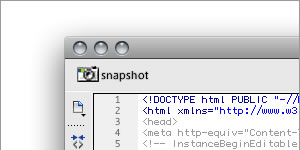
	<dd><img src="http://www.garterblue.com/snapshot/images/logo.jpg" width="300" height="150" alt="backup as snapshot on toolbar" /></dd>
	<dt>Directory to Backup</dt>
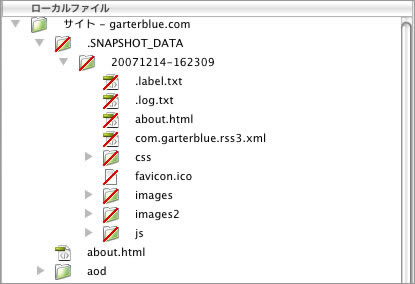
	<dd>The files were backuped to &quot;/.SNAPSHOT_DATA/YYYYMMDD-hhmmss/&quot;.<br /><br />
	&quot;.label.txt&quot; is used for &quot;Restore&quot; menu.<br />
	&quot;.log.txt&quot; is used for &quot;Log&quot;.<br />
	<br />
	When &quot;/about.html&quot; is backuped, <br />
	<br />
	<img src="http://www.garterblue.com/snapshot/images/panel.jpg" width="415" height="284" alt="snapshot toolbar" />      </dd>
	</dl>
	
	<div style="clear:both;"></div>
	
	<h2>New Released</h2>
	<h3>ver1.0.5</h3>
	<ul>
	<li>2008/02/14</li>
	<li>for CS4</li>
	<li>Choose targets(Folders and Files) on the Files Panel.</li>
	<li>Select/Open Backuped-Folder.</li>
	<li>Bug fixes.(writed "@import url(css.css)" in the html document.)</li>
	</ul>


</div>
</content>
</entry>


</feed>